25 Scale Up vs Scale Out
25.1 The Two Scaling Strategies
When your application needs more resources to handle increased load, you have two fundamental approaches:
Scale Up (Vertical Scaling): Make your server bigger
Scale Out (Horizontal Scaling): Add more servers
25.2 Scale Up (Vertical Scaling)
25.2.1 Concept
Adding more power to the SAME machine - more CPU, RAM, disk, etc.
BEFORE (Scale Up):              AFTER (Scale Up):

┌─────────────────┐            ┌─────────────────┐
│   Web Server    │            │   Web Server    │
│                 │            │                 │
│  CPU: 2 cores   │   ──>      │  CPU: 8 cores   │ ← More powerful
│  RAM: 4 GB      │            │  RAM: 16 GB     │ ← More memory
│  Disk: 100 GB   │            │  Disk: 500 GB   │ ← More storage
└─────────────────┘            └─────────────────┘

    1 Server                       1 Server
   (weaker)                      (stronger)
25.2.2 Radiology AI Example
Your CT Stroke Detection App:

BEFORE:                          AFTER:
┌─────────────────┐            ┌─────────────────┐
│  M3 Pro Mac     │            │  M3 Max Mac     │
│  • 11 cores     │   ──>      │  • 16 cores     │
│  • 36 GB RAM    │            │  • 128 GB RAM   │
│                 │            │                 │
│  Processes 5    │            │  Processes 15   │
│  CT scans/min   │            │  CT scans/min   │
└─────────────────┘            └─────────────────┘

Same number of machines (1)
But more powerful!
25.2.3 Characteristics
✅ Advantages: - Simpler architecture (still one machine) - No code changes needed - No load balancing complexity - Better for single-threaded applications - Maintains data locality (everything on one server)
❌ Disadvantages: - Limited - can only make machine so big - Expensive - high-end hardware costs more - Single point of failure - if server dies, everything stops - Downtime - usually requires restart to upgrade - Diminishing returns - 2x cost ≠ 2x performance
25.2.4 Real Limits
Consumer Hardware:
CPU: ~64 cores max
RAM: ~192 GB max
Cost: $5,000 - $15,000

Enterprise Hardware:
CPU: ~256 cores max
RAM: ~24 TB max
Cost: $100,000 - $1,000,000+

But there IS a ceiling! ←─── This is the problem
25.3 Scale Out (Horizontal Scaling)
25.3.1 Concept
Adding more machines of the same size to distribute the load.
BEFORE (Scale Out):            AFTER (Scale Out):

┌─────────────┐               ┌─────────────┐  ┌─────────────┐  ┌─────────────┐
│ Web Server  │               │ Web Server  │  │ Web Server  │  │ Web Server  │
│             │    ──>        │             │  │             │  │             │
│ 2 cores     │               │ 2 cores     │  │ 2 cores     │  │ 2 cores     │
│ 4 GB RAM    │               │ 4 GB RAM    │  │ 4 GB RAM    │  │ 4 GB RAM    │
└─────────────┘               └─────────────┘  └─────────────┘  └─────────────┘

  1 Server                          3 Servers (same specs)

                                   Load Balancer
                                        │
                            ┌───────────┼───────────┐
                            │           │           │
                            ▼           ▼           ▼
                         Server 1   Server 2   Server 3
25.3.2 Radiology AI Example
High Volume Day at Ramathibodi:

BEFORE:                          AFTER:
┌────────────────┐              ┌────────────────┐
│  Single Server │              │ Load Balancer  │
│  Processing    │              └───────┬────────┘
│  CT Strokes    │                      │
│                │              ┌───────┼───────┬───────┐
│  Queue: 50     │              │       │       │       │
│  scans waiting │              ▼       ▼       ▼       ▼
└────────────────┘         ┌─────┐ ┌─────┐ ┌─────┐ ┌─────┐
                           │Srv 1│ │Srv 2│ │Srv 3│ │Srv 4│
   Can't keep up!          └─────┘ └─────┘ └─────┘ └─────┘

                           Queue: 0 - all scans processed!
25.3.3 Characteristics
✅ Advantages: - Unlimited scaling - just add more servers - High availability - if one fails, others continue - No downtime - add servers without stopping - Cost effective - use commodity hardware - Geographic distribution - servers in different locations
❌ Disadvantages: - More complex architecture - Requires load balancing - Need to handle state management - Requires stateless application design - More moving parts = more can break - Network overhead between servers
25.4 Azure-Specific Implementation
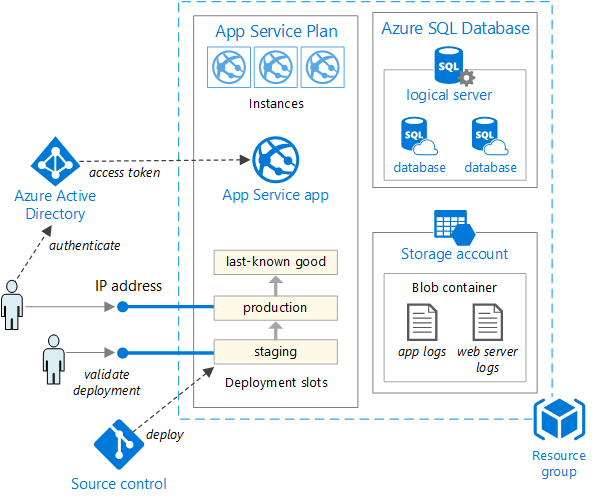
Looking at your diagram, let’s map these concepts to Azure services:
25.4.1 Azure App Service Plan: Both Strategies Available
┌─────────────────────────────────────────────────────────┐
│            Azure App Service Plan                       │
│                                                         │
│  SCALE UP:                 SCALE OUT:                   │
│  Change tier ───────────── Add instances                │
│                                                         │
│  ┌──────────────┐         ┌───┐ ┌───┐ ┌───┐             │
│  │              │         │   │ │   │ │   │             │
│  │  Tier: B1    │         │ 1 │ │ 2 │ │ 3 │ ← Instances │
│  │  1 core      │         │   │ │   │ │   │             │
│  │  1.75 GB     │         └───┘ └───┘ └───┘             │
│  │              │                                       │
│  └──────────────┘         Auto-scale rules:             │
│       ↓                   • CPU > 70% → add instance    │
│  ┌──────────────┐         • CPU < 30% → remove instance │
│  │  Tier: P2V3  │                                       │
│  │  4 cores     │                                       │
│  │  16 GB       │                                       │
│  └──────────────┘                                       │
└─────────────────────────────────────────────────────────┘
25.4.2 Scale Up in Azure App Service
Changing the pricing tier = Scale Up
Pricing Tiers (Examples):

Free/Shared:
┌──────────┐
│ F1       │  60 min/day, 1 GB RAM
└──────────┘

Basic:
┌──────────┐
│ B1       │  1 core, 1.75 GB   $13/month
│ B2       │  2 cores, 3.5 GB   $26/month
│ B3       │  4 cores, 7 GB     $52/month
└──────────┘

Standard:
┌──────────┐
│ S1       │  1 core, 1.75 GB   $70/month
│ S2       │  2 cores, 3.5 GB   $140/month
│ S3       │  4 cores, 7 GB     $280/month
└──────────┘

Premium:
┌──────────┐
│ P1V3     │  2 cores, 8 GB     $117/month
│ P2V3     │  4 cores, 16 GB    $234/month
│ P3V3     │  8 cores, 32 GB    $468/month
└──────────┘

Each tier = bigger machine (Scale Up!)
25.4.3 Scale Out in Azure App Service
Adding instances within a tier = Scale Out
Example: P2V3 Tier Scaled Out

                    ┌────────────────┐
                    │ Load Balancer  │
                    └────────┬───────┘
                             │
              ┌──────────────┼──────────────┐
              │              │              │
              ▼              ▼              ▼
        ┌──────────┐   ┌──────────┐   ┌──────────┐
        │Instance 1│   │Instance 2│   │Instance 3│
        │          │   │          │   │          │
        │ P2V3     │   │ P2V3     │   │ P2V3     │
        │ 4 cores  │   │ 4 cores  │   │ 4 cores  │
        │ 16 GB    │   │ 16 GB    │   │ 16 GB    │
        └──────────┘   └──────────┘   └──────────┘

Total capacity: 12 cores, 48 GB
Cost: $234/month × 3 = $702/month
25.4.4 From Your Diagram: Deployment Slots
The diagram shows deployment slots (staging, production, last-known good):
┌─────────────────────────────────────────────┐
│         App Service Plan                    │
│                                             │
│  ┌───────────────────────────────────────┐  │
│  │  Production Slot                      │  │
│  │  ┌───┐  ┌───┐  ┌───┐                  │  │
│  │  │ 1 │  │ 2 │  │ 3 │ ← 3 instances    │  │ ← Scale Out
│  │  └───┘  └───┘  └───┘                  │  │
│  └───────────────────────────────────────┘  │
│                                             │
│  ┌───────────────────────────────────────┐  │
│  │  Staging Slot                         │  │
│  │  ┌───┐                                │  │
│  │  │ 1 │ ← 1 instance                   │  │
│  │  └───┘                                │  │
│  └───────────────────────────────────────┘  │
│                                             │
│  All running on P2V3 tier ←── Scale Up      │
└─────────────────────────────────────────────┘
Slots share the same App Service Plan resources but allow: - Testing before production - Zero-downtime deployments - Easy rollback
25.5 Decision Matrix: When to Use Each?
25.5.1 Use Scale Up When:
✅ GOOD FOR:

┌─────────────────────────────────┐
│ • Single-threaded apps          │
│ • Memory-intensive operations   │
│ • Apps with state/sessions      │
│ • Quick fix for performance     │
│ • Development/testing           │
│ • Small to medium traffic       │
└─────────────────────────────────┘

Example: Your CT stroke model needs more RAM
to load larger deep learning models
→ Scale Up from 8GB to 16GB
25.5.2 Use Scale Out When:
✅ GOOD FOR:

┌─────────────────────────────────┐
│ • Stateless applications        │
│ • High availability required    │
│ • Variable traffic patterns     │
│ • Large number of users         │
│ • Geographic distribution       │
│ • Cost optimization             │
└─────────────────────────────────┘

Example: During peak hours (8am-12pm) at hospital,
CT scan requests increase 10x
→ Scale Out from 2 to 10 instances automatically
25.6 Radiology AI Real-World Scenario
25.6.1 Development Phase
┌────────────────────────────────┐
│  Your MacBook (Local)          │
│  • M3 Pro (11 cores, 36GB)     │
│  • 1 instance                  │
│  • Testing models              │
└────────────────────────────────┘

Strategy: Nothing - sufficient for dev
25.6.2 Initial Production
┌────────────────────────────────┐
│  Azure App Service             │
│  • Tier: P1V3 (2 cores, 8GB)   │ ← Scaled Up from B1
│  • 1 instance                  │
│  • Handles 10 scans/hour       │
└────────────────────────────────┘

Usage: Low volume testing
Strategy: Scale Up to handle production workload
25.6.3 Growing Usage
Problem: During rounds (8am-10am),
         50 CT scans requested simultaneously!

Solution: Scale Out!

┌──────────────────────────────────────────┐
│  Azure App Service Plan                  │
│  • Tier: P1V3 (2 cores, 8GB)             │ ← Same tier
│  • 5 instances ←────────────────────────── Scaled Out!
│  • Auto-scale rule:                      │
│    - If CPU > 70% → add 1 instance       │
│    - If CPU < 30% → remove 1 instance    │
│    - Min: 2, Max: 10                     │
└──────────────────────────────────────────┘

         Load Balancer
              │
    ┌─────────┼─────────┬─────────┬─────────┐
    ▼         ▼         ▼         ▼         ▼
┌──────┐ ┌──────┐ ┌──────┐ ┌──────┐ ┌──────┐
│Inst 1│ │Inst 2│ │Inst 3│ │Inst 4│ │Inst 5│
└──────┘ └──────┘ └──────┘ └──────┘ └──────┘
25.6.4 Peak Load + Complex Model
Problem: New model requires 16GB RAM
         AND peak load still high

Solution: Scale Up + Scale Out!

┌──────────────────────────────────────────┐
│  Azure App Service Plan                  │
│  • Tier: P2V3 (4 cores, 16GB) ←───────── Scaled Up!
│  • 8 instances ←────────────────────────── Scaled Out!
│                                          │
│  Cost: $234/month × 8 = $1,872/month     │
└──────────────────────────────────────────┘

Best of both worlds!
25.7 Azure SQL Database: Same Concepts
From your diagram, the SQL Database also supports both:
25.7.1 Scale Up (Change Service Tier)
DTU-based:
┌──────────┐
│ Basic    │  5 DTUs, 2GB
│ Standard │  10-3000 DTUs, 250GB
│ Premium  │  125-4000 DTUs, 1TB
└──────────┘

vCore-based:
┌──────────┐
│ 2 vCores │  2 cores, 10.2GB
│ 4 vCores │  4 cores, 20.4GB
│ 8 vCores │  8 cores, 40.8GB
└──────────┘
25.7.2 Scale Out (Read Replicas)
Primary (Read/Write):
┌─────────────────┐
│   SQL Primary   │
│   (Write)       │
└────────┬────────┘
         │
         │ Replication
    ┌────┼────┬────────┐
    ▼    ▼    ▼        ▼
┌──────┐ ┌──────┐ ┌──────┐
│Repli │ │Repli │ │Repli │
│ca 1  │ │ca 2  │ │ca 3  │
│(Read)│ │(Read)│ │(Read)│
└──────┘ └──────┘ └──────┘

Distribute read queries across replicas
25.8 Key Takeaways
25.8.1 Quick Reference
SCALE UP:                    SCALE OUT:
┌──────────┐                ┌───┐┌───┐┌───┐
│          │                │   ││   ││   │
│  Bigger  │                └───┘└───┘└───┘
│  Machine │                  More Machines
│          │
└──────────┘

• Limited ceiling            • Unlimited growth
• Simple setup              • Requires load balancer
• Good for stateful         • Best for stateless
• Single point of failure   • High availability
• Quick but expensive       • Cost effective at scale
25.8.2 Combined Strategy (Most Common)
Best Practice for Production:

1. Scale Up to appropriate baseline tier
2. Scale Out for traffic variations
3. Use auto-scaling for cost optimization

Example:
┌────────────────────────────────┐
│  P2V3 tier ←── Scale Up        │
│  2-10 instances ←── Scale Out  │
│  Auto-scale: CPU-based         │
└────────────────────────────────┘
25.8.3 For Your Radiology AI Projects
Recommendation:

Development:
• Local Mac (no scaling needed)

Staging:
• P1V3 tier, 1 instance
• Test under realistic conditions

Production:
• P2V3 tier (16GB for ML models) ←── Scale Up
• 2-8 instances (auto-scale) ←────── Scale Out
• Based on daily patterns:
  - 8am-12pm: High (8 instances)
  - 1pm-5pm: Medium (4 instances)
  - 6pm-7am: Low (2 instances)
25.9 Summary
Scale Up = Vertical = Bigger machine (more CPU/RAM/disk)
Scale Out = Horizontal = More machines (additional instances)
In Azure:
- Scale Up: Change pricing tier (B1 → P2V3)
- Scale Out: Add instances (1 → 10 instances)
Best approach: Use both strategically!